Scenario
Management suspects that some employees may be using TOR browsers to bypass network security controls because recent network logs show unusual encrypted traffic patterns and connections to known TOR entry nodes.
Investigation Plan
Three MDE telemetry tables were targeted to confirm or deny TOR browser usage on the endpoint tyler-windows10:
- Check
DeviceFileEventsfor anytor(.exe)orfirefox(.exe)file events - Check
DeviceProcessEventsfor any signs of installation or usage - Check
DeviceNetworkEventsfor any outgoing connections over known TOR ports
Step 1: DeviceFileEvents
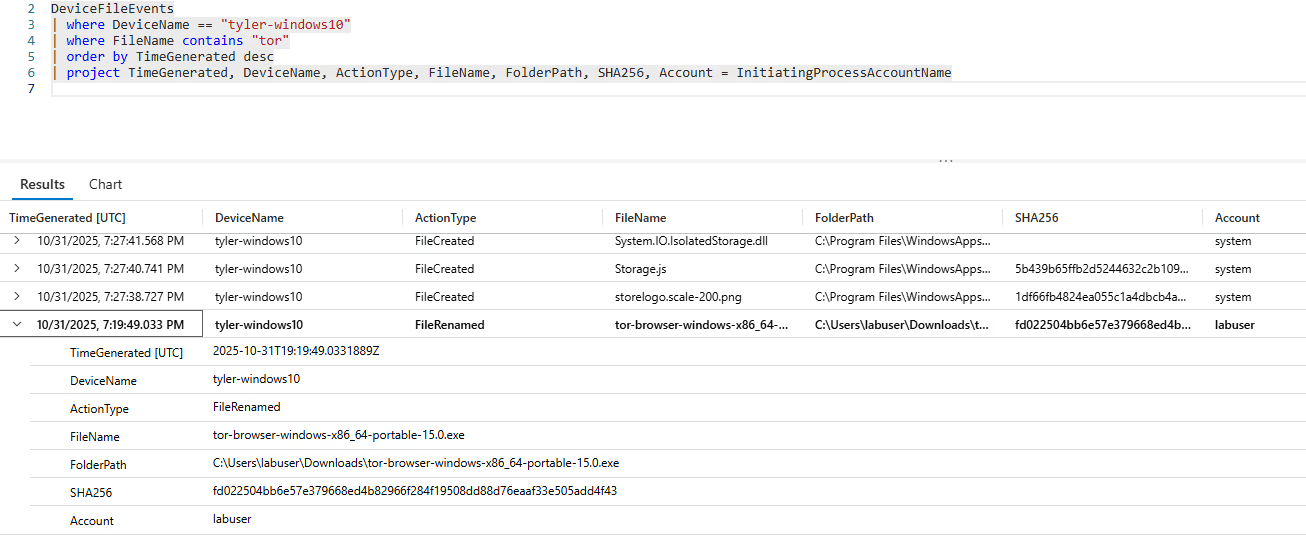
The investigation began by examining file creation and modification logs. The query targeted the specific device and searched for TOR-related filenames:
DeviceFileEvents
| where DeviceName == "tyler-windows10"
| where FileName contains "tor"
| order by TimeGenerated desc
| project TimeGenerated, DeviceName, ActionType, FileName, FolderPath, SHA256,
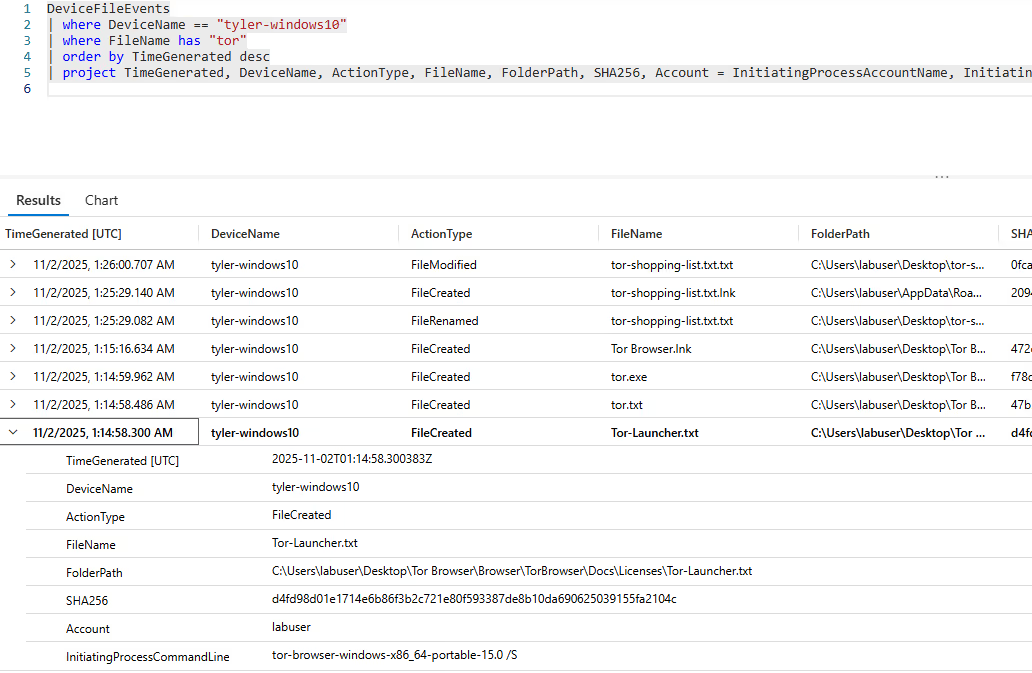
Account = InitiatingProcessAccountNameThe query revealed a TOR executable download and subsequent rename to tor-browser-windows-x86_64-portable-15.0.exe at 2025-10-31T19:19:49Z. An extended query adding InitiatingProcessCommandLine showed the executable was run with a /S switch, indicating a silent installation to avoid user prompts and stay stealthy.
Step 2: DeviceProcessEvents
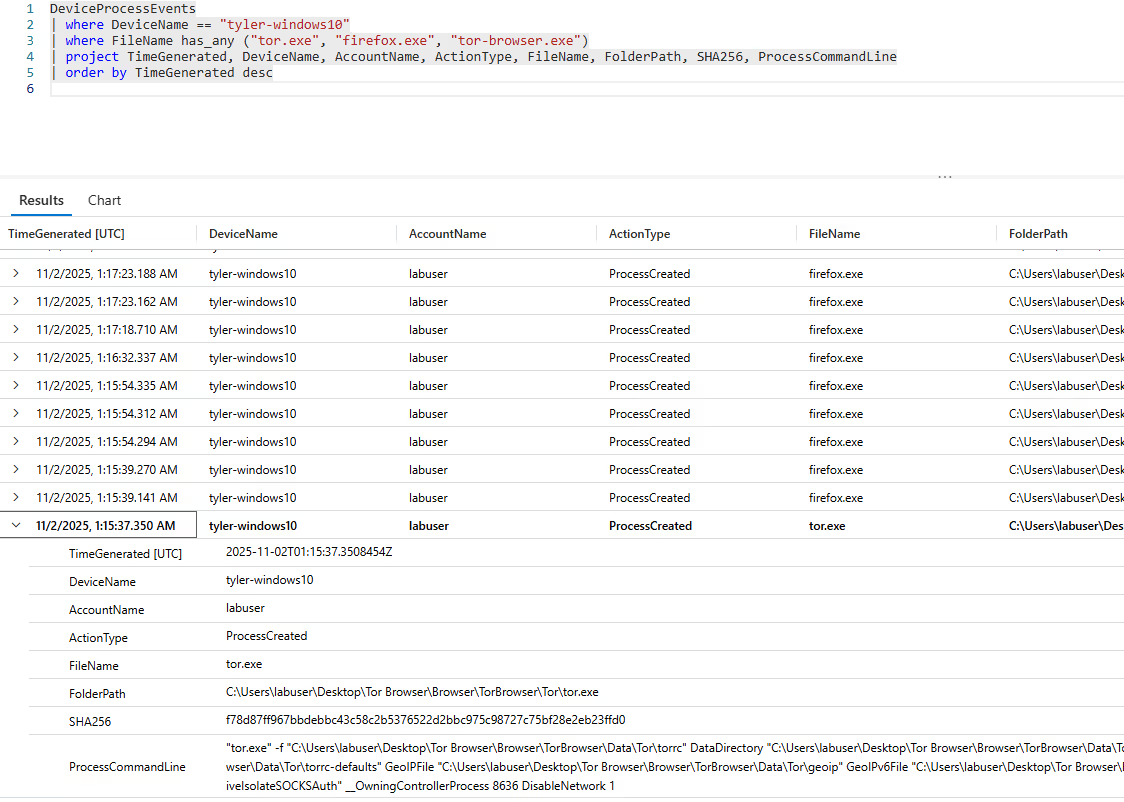
This phase verified whether the TOR browser was actually executed on the system, not just downloaded:
DeviceProcessEvents
| where DeviceName == "tyler-windows10"
| where FileName has_any ("tor.exe", "firefox.exe", "tor-browser.exe")
| project TimeGenerated, DeviceName, AccountName, ActionType, FileName,
    FolderPath, SHA256, ProcessCommandLine
| order by TimeGenerated descEvidence confirmed the user opened tor.exe at 2025-11-02T01:15:35Z, with several subsequent instances of firefox.exe and tor.exe processes observed afterward, confirming active use, not just installation.
Step 3: DeviceNetworkEvents
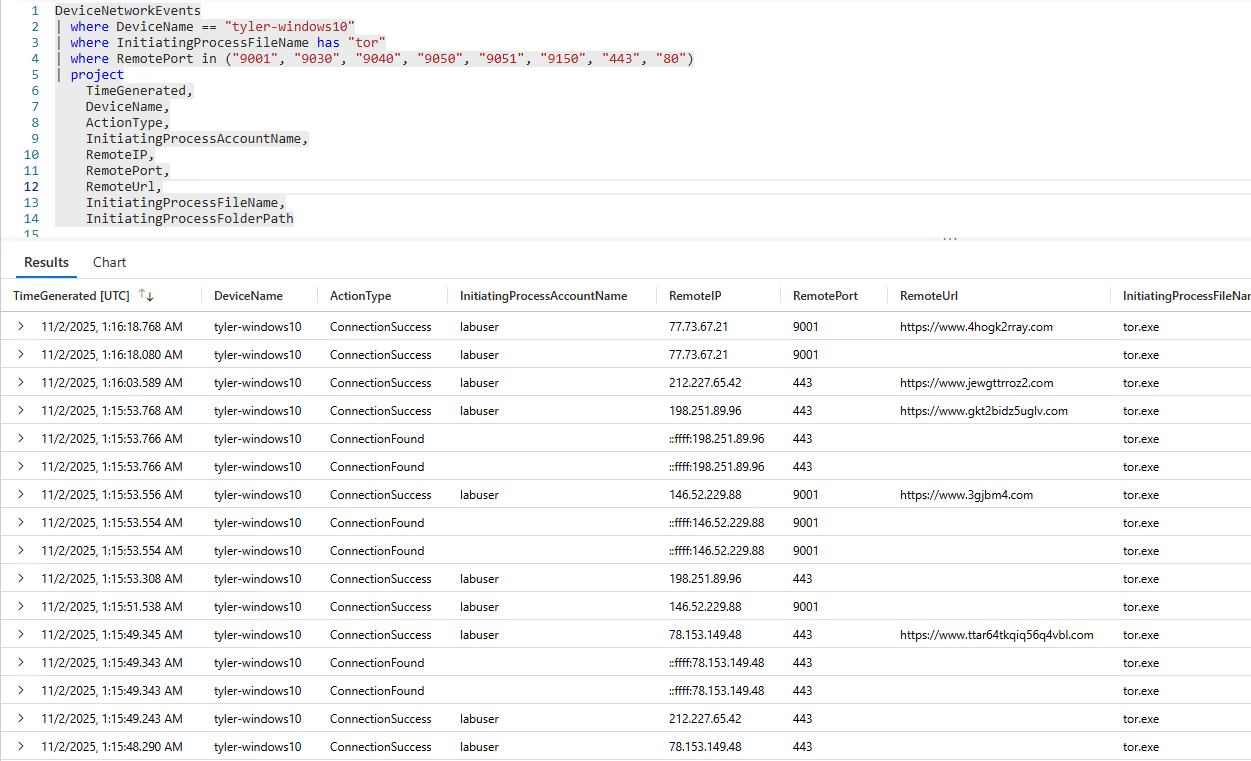
The final phase examined network connections established by the TOR process to identify accessed destinations and confirm live TOR circuit usage:
DeviceNetworkEvents
| where DeviceName == "tyler-windows10"
| where InitiatingProcessFileName has "tor"
| where RemotePort in ("9001", "9030", "9040", "9050", "9051", "9150", "443", "80")
| project TimeGenerated, DeviceName, ActionType, InitiatingProcessAccountName,
    RemoteIP, RemotePort, RemoteUrl,
InitiatingProcessFileName, InitiatingProcessFolderPathMultiple connections to port 9001 were identified, confirming the user was connected to the TOR network, which is against the company's acceptable use policy.
Event Timeline
fd022504bb6e57e379668ed4b82966f284f19508dd88d76eaaf33e505add4f43)/S silent installation flag from C:\Users\labuser\Downloads\tor-shopping-list.txt createdtor.exe successfully connected to 77.73.67.21 on port 9001, confirming active TOR network communicationSummary
The user labuser on device tyler-windows10 downloaded a TOR portable installer, silently installed it to avoid detection, launched the TOR Browser (bundle files copied to Desktop and tor-shopping-list.txt created), and then used TOR to establish outbound connections, including to 77.73.67.21:9001, confirming both installation and active use.
Response Taken
TOR usage was confirmed on endpoint tyler-windows10 by user labuser. The device was isolated from the network and the user's direct manager was notified for further disciplinary and HR review.
Use of TOR Browser on company endpoints violates the organization's acceptable use policy. The encrypted, anonymized traffic bypasses network security controls and monitoring, creating an unacceptable blind spot for the security team.