Project Overview
This project simulates the implementation of a comprehensive vulnerability management program, from inception to completion. It starts with an organization that lacks any existing vulnerability management policies or practices, and finishes with a formal policy enacted, stakeholder buy-in secured, and a full organization-wide vulnerability remediation cycle completed successfully.
Step 1: Policy Draft
This phase focused on drafting a Vulnerability Management Policy as a starting point for stakeholder engagement. The initial draft outlines scope, responsibilities, and remediation timelines, and may be adjusted based on feedback from relevant departments to ensure practical implementation before final approval by upper management.
Scope: All IT assets owned or operated by LogN Pacific, including networks, servers, endpoints, and associated applications.
Responsibilities
- CISO: Oversight of vulnerability management process and policy compliance
- Department Heads: Compliance within respective departments
- CIO: Ensuring vulnerability management integrates with overall IT strategy
Remediation Cadence (CVSS-Based), v1.1
| Severity | CVSS Range | Window |
|---|---|---|
| Critical RCE Zero-Day | 9.0-10 | 48 hours |
| Critical | 9.0-10 | 48 hours |
| High | 7.0-8.9 | 7 days |
| Medium | 4.0-6.9 | 30 days |
| Low | 0.1-3.9 | 90 days |
Step 2: Stakeholder Buy-In
A meeting with the server team introduced the draft policy and assessed their capability to meet the proposed remediation timelines. Feedback led to key adjustments before final sign-off.
Step 3: Policy Finalization
After gathering feedback, the policy was revised with updated remediation timelines. Final approval was obtained from upper management, and the policy now serves as the authoritative reference for the program.
Remediation Cadence (CVSS-Based), v1.2 (Final)
| Severity | CVSS Range | Window |
|---|---|---|
| Critical RCE Zero-Day | 9.0-10 | 48 hours |
| Critical | 9.0-10 | 7 days |
| High | 7.0-8.9 | 2 weeks |
| Medium | 4.0-6.9 | 30 days |
| Low | 0.1-3.9 | 90 days |
Sign-off: CISO Mike Smith · CIO Jane Doe · CEO Bob Roberts, August 20, 2025
Step 4: Scan Permission Meeting
Before initiating scans, a meeting with the server team was held to coordinate credentialed scan access. A just-in-time Active Directory credential approach was agreed upon to minimize risk.
Step 5: Initial Scan
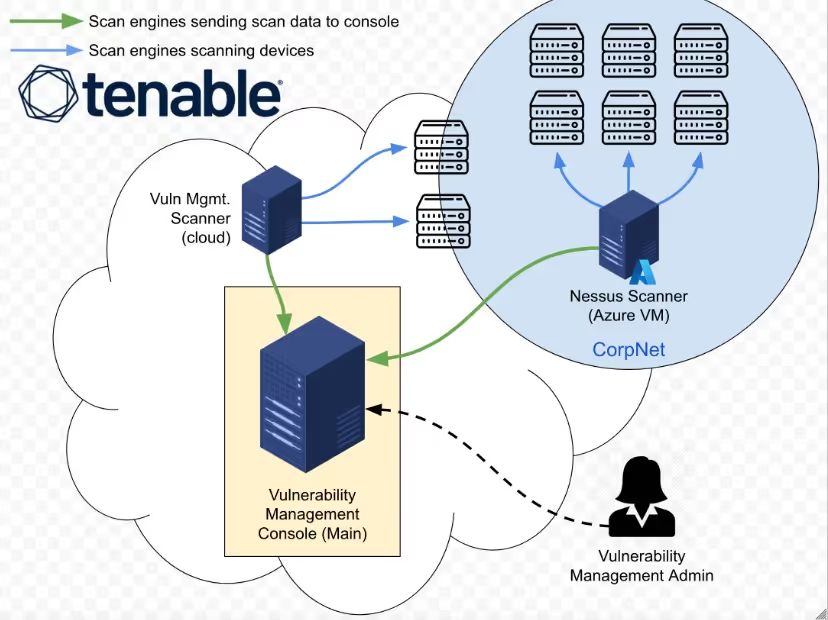
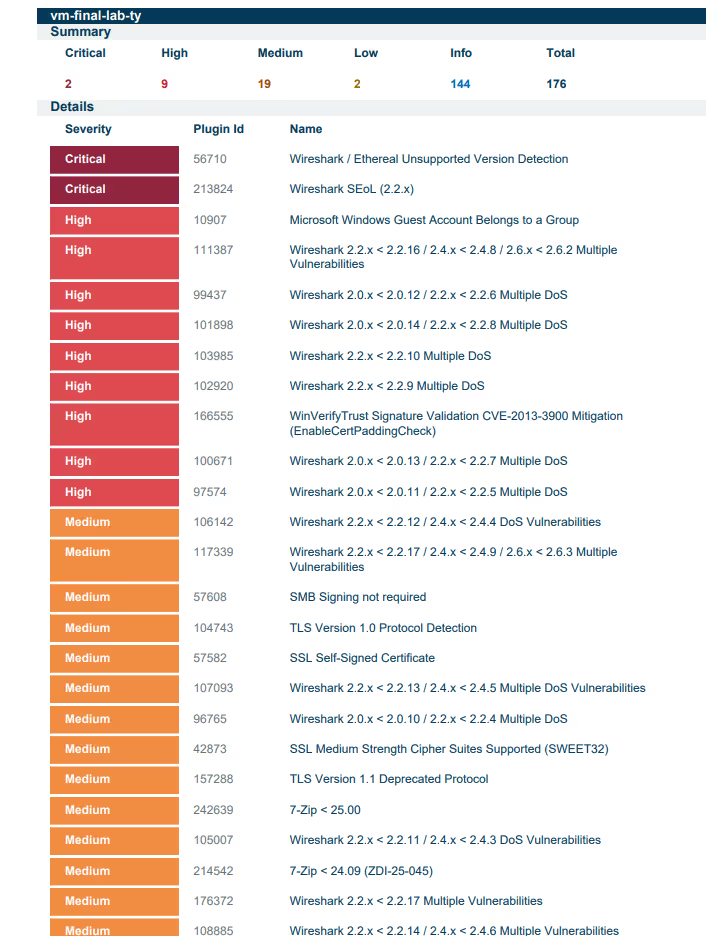
An insecure Windows Server was provisioned in Azure to simulate the server team's environment. Vulnerabilities were intentionally introduced, then an authenticated Tenable scan was performed and results exported for the remediation phase.
Step 6: Assessment & Prioritization
Vulnerabilities were assessed and a remediation priority order was established based on ease of remediation and impact:
- Third-party software removal (Wireshark)
- Windows OS secure configuration: Protocols & Ciphers
- Windows OS secure configuration: Guest Account Group Membership
- Windows OS Updates
Step 7: Distributing Remediations
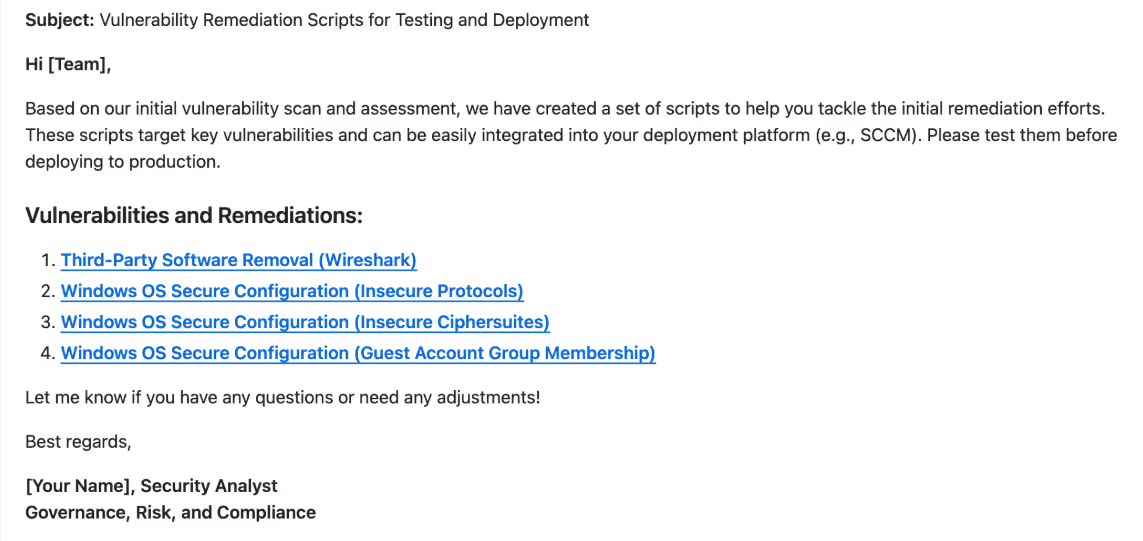
The server team received remediation scripts and scan reports to address key vulnerabilities. This streamlined their efforts and prepared them for a follow-up validation scan.
Step 8: Post-Scan Review Meeting
Step 9: CAB Approval
Step 10: Remediation Effort
Round 1: Wireshark Removal
# Uninstalls Wireshark from the system.
# Author: Josh Madakor | Version: 1.0
# Run as Administrator.

$wiresharkDisplayName = "Wireshark 2.2.1 (64-bit)"
$uninstallerPath = "$env:ProgramFiles\Wireshark\uninstall.exe"
$silentUninstallSwitch = "/S"

function Is-WiresharkInstalled {
    return Test-Path -Path $uninstallerPath
}

function Uninstall-Wireshark {
    if (Is-WiresharkInstalled) {
        Write-Output "Uninstalling Wireshark..."
        & $uninstallerPath $silentUninstallSwitch
        Write-Output "$($wiresharkDisplayName) has been uninstalled."
    } else {
        Write-Output "$($wiresharkDisplayName) is not installed."
    }
}

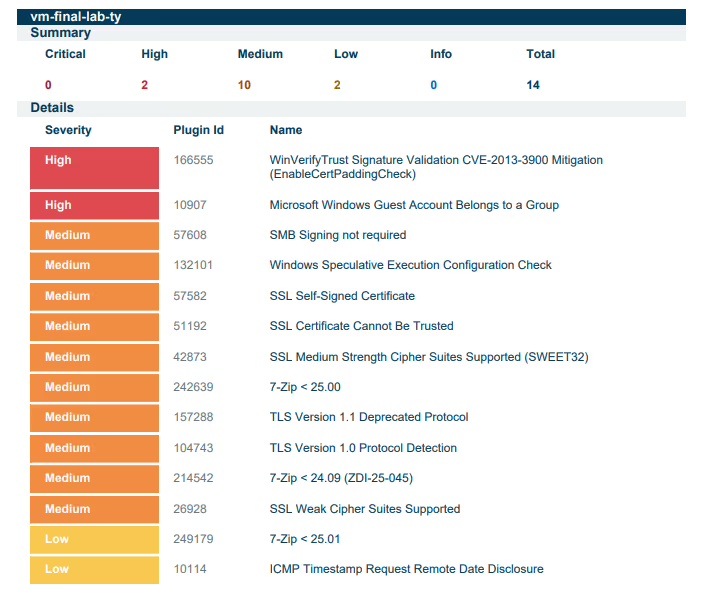
Uninstall-WiresharkFollow-up scan confirmed successful Wireshark removal. Critical vulnerabilities dropped to zero.
Round 2: Insecure Protocols & Ciphers
# Toggles cipher suites (secure vs insecure) on the system.
# Author: Josh Madakor | Version: 1.0
# Set $secureEnvironment = $true to harden the system.

$secureEnvironment = $true

$secureCipherSuites = "TLS_AES_256_GCM_SHA384,TLS_AES_128_GCM_SHA256," +
    "TLS_ECDHE_ECDSA_WITH_AES_256_GCM_SHA384,TLS_ECDHE_ECDSA_WITH_AES_128_GCM_SHA256," +
    "TLS_ECDHE_RSA_WITH_AES_256_GCM_SHA384,TLS_ECDHE_RSA_WITH_AES_128_GCM_SHA256," +
    "TLS_DHE_RSA_WITH_AES_256_GCM_SHA384,TLS_DHE_RSA_WITH_AES_128_GCM_SHA256"

$regPath = "HKLM:\SOFTWARE\Policies\Microsoft\Cryptography\Configuration\SSL\00010002"

if (-not (Test-Path $regPath)) {
    New-Item -Path $regPath -Force
}

if ($secureEnvironment) {
    $selectedCipherSuites = $secureCipherSuites
    Write-Output "Configuring a secure environment..."
} else {
    Write-Output "Configuring an insecure environment..."
}

Set-ItemProperty -Path $regPath -Name "Functions" -Value $selectedCipherSuites
Set-ItemProperty -Path $regPath -Name "Enabled" -Value 1

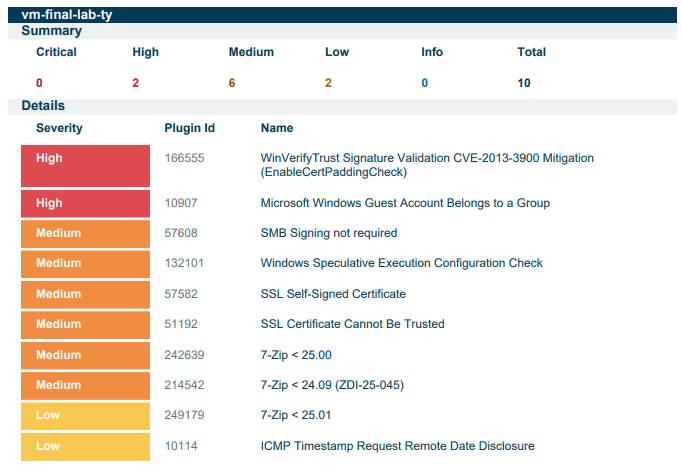
Write-Output "Cipher suites updated. Please restart the server for changes to take effect."Follow-up scan confirmed TLS 1.0/1.1 and insecure cipher suites removed. High vulnerabilities dropped by 90%.
Round 3: Guest Account Group Membership
# Toggles guest account Administrators group membership.
# Author: Josh Madakor | Version: 1.0
# Set $AddGuestToAdminGroup = $False to secure the system.

$AddGuestToAdminGroup = $False
$LocalAdminGroup = "Administrators"
$GuestAccount = "Guest"

function Add-GuestToAdminGroup {
    if (-not (Get-LocalGroupMember -Group $LocalAdminGroup -Member $GuestAccount -ErrorAction SilentlyContinue)) {
        Add-LocalGroupMember -Group $LocalAdminGroup -Member $GuestAccount
        Write-Output "Guest account has been added to the Administrators group."
    } else {
        Write-Output "Guest account is already a member of the Administrators group."
    }
}

function Remove-GuestFromAdminGroup {
    if (Get-LocalGroupMember -Group $LocalAdminGroup -Member $GuestAccount -ErrorAction SilentlyContinue) {
        Remove-LocalGroupMember -Group $LocalAdminGroup -Member $GuestAccount
        Write-Output "Guest account has been removed from the Administrators group."
    } else {
        Write-Output "Guest account is not a member of the Administrators group."
    }
}

if ($AddGuestToAdminGroup -eq $True) {
    Add-GuestToAdminGroup
} else {
    Remove-GuestFromAdminGroup
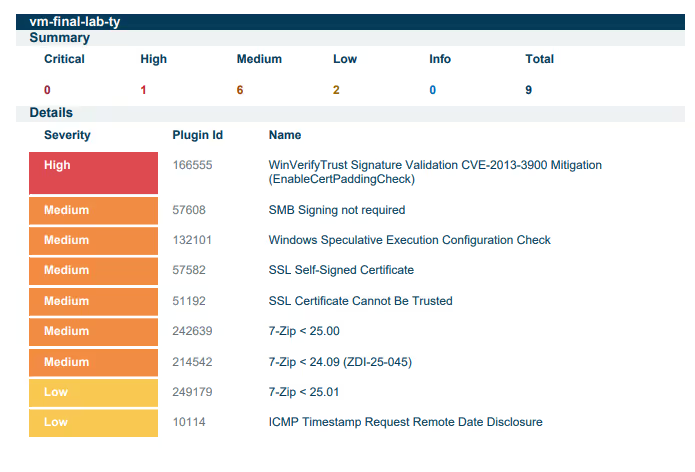
}Guest account successfully removed from the Administrators group. Confirmed via follow-up scan.
Round 4: Windows OS Updates
Windows Update was re-enabled and all available patches were applied until the system reached a fully up-to-date state.
Summary
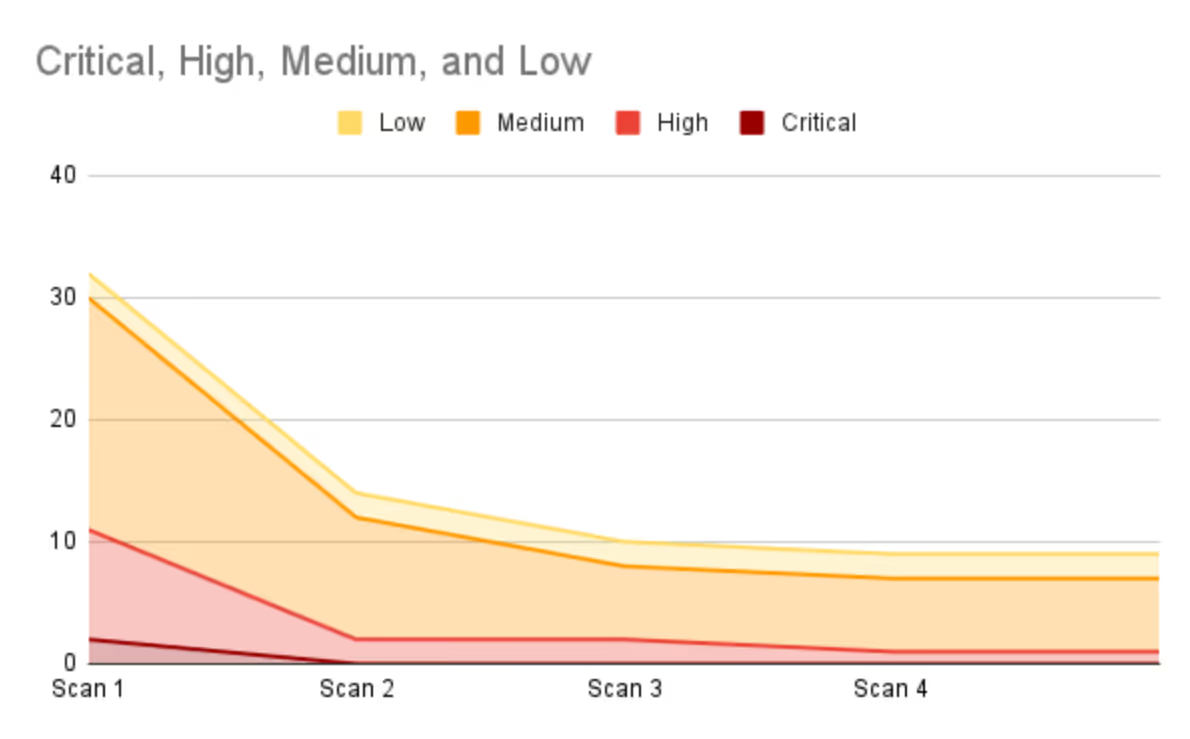
The remediation process reduced total vulnerabilities by 72%, from 32 to 9 (excluding informational findings).
- Critical vulnerabilities: 100% resolved by the second scan
- High vulnerabilities: 90% reduction
- Medium vulnerabilities: 68% reduction
In a real production environment, asset criticality would further guide prioritization of remaining remediation efforts.
Maintenance Mode
After completing the initial remediation cycle, the vulnerability management program transitions into Maintenance Mode, ensuring vulnerabilities continue to be managed proactively over time.
Key Maintenance Activities
- Scheduled Vulnerability Scans: Regular scans (weekly or monthly) to detect new vulnerabilities as systems evolve
- Patch Management: Continuously apply security patches, ensuring no critical vulnerabilities remain unpatched
- Remediation Follow-ups: Address newly identified vulnerabilities promptly, prioritizing by risk and impact
- Policy Review: Periodically review the Vulnerability Management Policy to ensure alignment with current security best practices
- Audit & Compliance: Conduct internal audits to ensure compliance with the policy and external regulations
- Stakeholder Communication: Maintain open communication with remediation teams for efficient coordination
By maintaining an active vulnerability management process, organizations can stay ahead of emerging threats and ensure long-term security resilience.